Introducing Gloo AI Studio
Great developers have always asked "how." The best ones are starting to ask "what for."

Gloo AI Studio is a platform where you can build apps using AI models, but these aren’t just any ordinary models. These are models that have been set up in a purpose-built harness so that they align with values that lead to human flourishing. That’s a loaded term, I know. What exactly does it mean? We have benchmarks to show why it matters, but we’ll save that for another post. For now, here are three reasons why you should check out Gloo AI Studio.
1. Access a Values-Aligned AI System, Ready to Go
Gloo AI Studio gives you the freedom to try out different models using the AI Playground and see how they respond to questions that align more closely with human flourishing, questions like “How can I practice spiritual mindfulness?” or “What is my purpose in this world?”
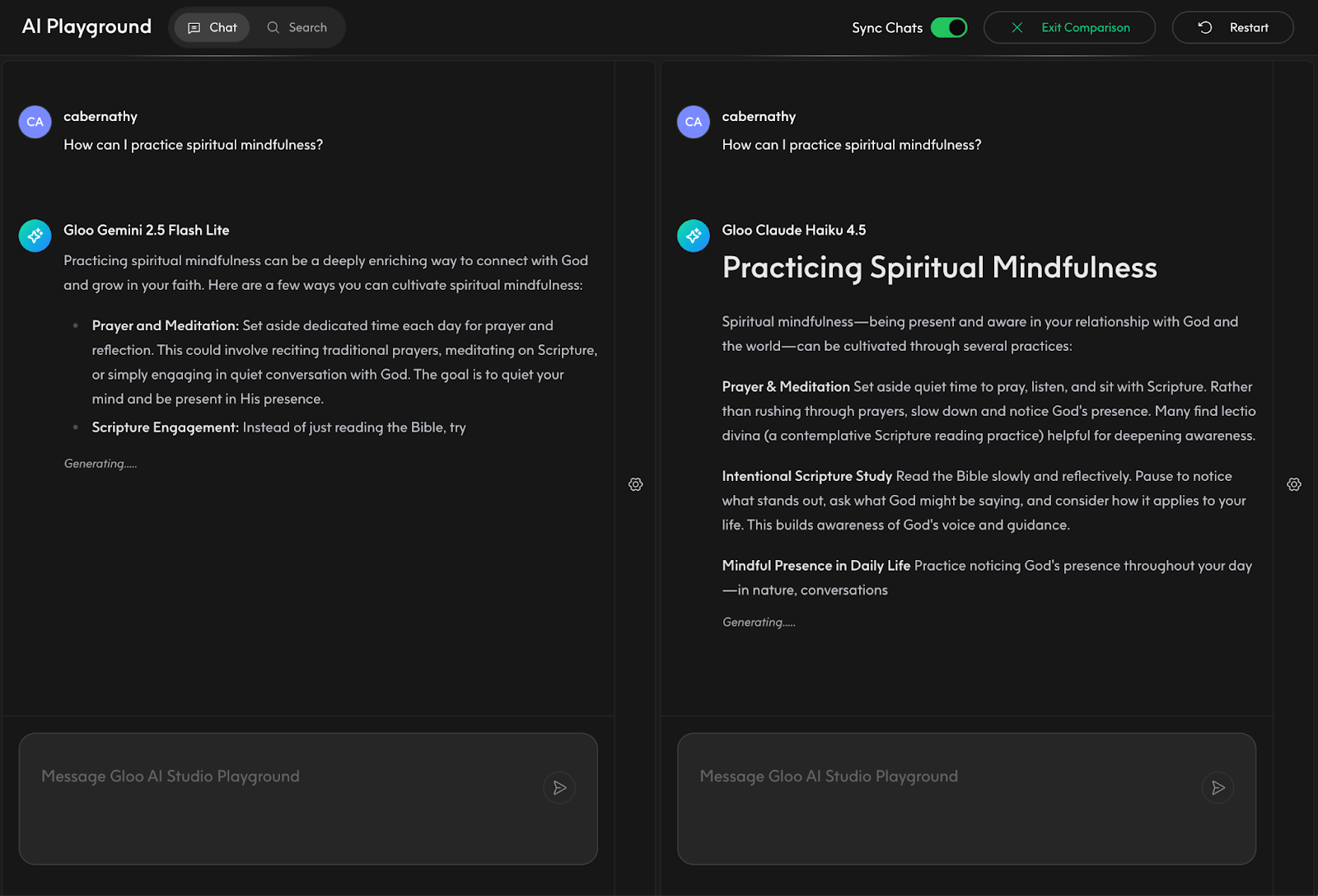
You can ask existing chatbots these questions and probably get a reasonable answer, but those answers might not be the kind you’d want surfaced in your own apps. Sure, you could build that out yourself, perhaps craft a custom system prompt and tune the behavior, but that takes real effort. We’ve already done that work for you.
Beyond the Chat Playground for testing models, the system also includes a full guardrail harness: input guardrails that screen what comes in when users ask questions, a choice of underlying models you can select from, and output guardrails that make sure responses don’t go off the rails. All of this is served up to you, no heavy lifting required.
2. Drop-In OpenAI-Compatible APIs
If you’re already a developer using another model provider, switching over to try Gloo AI Studio is straightforward. We’re compatible with OpenAI’s Chat Completions API, so if your app is already calling /v1/chat/completions, most of your code stays exactly the same. You’ll add a short authentication step to exchange your credentials for a bearer token (a one-time addition to your setup code), and then it’s just a base URL change from there.
We also have documentation to help you get up and running quickly.
3. Ground Your AI Responses in Your Own Data
Beyond straight completions, you may want your AI to answer questions based on your own data. The most popular approach for this is Retrieval Augmented Generation (RAG), a pattern where, when a question is asked, the system knows how to find and reference relevant content from your data before generating a response.
Gloo AI Studio has a Grounded Completions endpoint that handles exactly this. You simply upload your content into what we call the Data Engine component inside the studio. That content is private so only you can see it. Once it’s uploaded, you can use the API to make Grounded Completions calls that draw on your data.
Note: Grounded Completions requires an Enterprise plan.
Ready to Get Started?
To recap, here’s why you should try Gloo AI Studio today:
Play with values-aligned models backed by input and output guardrails.
Use a drop-in, OpenAI-compatible API that works with your existing code.
Get responses grounded in your own data via the Grounded Completions endpoint.
We’ve got tutorials to show you how to set up and use the Playground, how to use the Completions API, and how to bring your data into Gloo AI Studio for grounded responses. Go check it out and start building applications that better serve you and your audience.
Which Plan Is Right for You?
There’s a plan for wherever you are in your journey. The Free plan gets you into the Playground right away, no credit card needed, so you can explore models and test responses before writing a single line of code. When you’re ready to build, the Pay-as-you-go plan unlocks full API access across 19 models with a 5.5% platform fee and spend controls so you don’t get surprised. And if you’re building at scale or need Grounded Completions for your own data, the Enterprise plan has bulk discounts and the full feature set. See all plans →
Where to Go Next
Sign-up for Gloo AI Studio and explore the docs to start building
Want to connect with other developers building on Gloo AI? Join the Gloo Developer Network on Discord and head over to the #gloo-studio channel for any questions you have around using Gloo AI Studio. The community is a great place to ask questions, share what you’re building, and hear what others are working on.